
**Seamlessly Integrate Claude Code with Codex** *- from [GuDaStudio](https://cc.guda.studio/)*
[](https://opensource.org/licenses/MIT) [](https://www.python.org/downloads/) [](https://modelcontextprotocol.io)
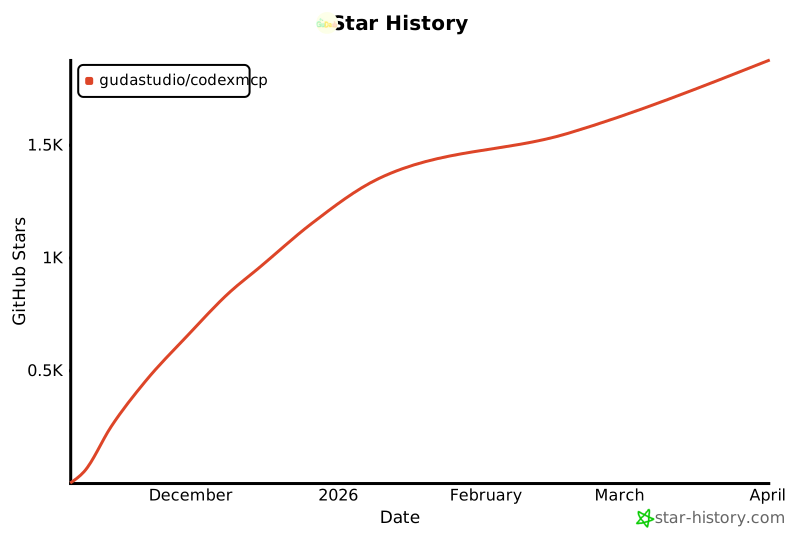
⭐ Star us on GitHub! Your support means the world to us! 🙏😊
[](https://x.com/intent/tweet?text=CodexMCP:Seamlessly%20integrate%20Claude%20Code%20with%20Codex%20https://github.com/GuDaStudio/codexmcp%20%23AI%20%23Coding%20%23MCP) [](https://www.facebook.com/sharer/sharer.php?u=https://github.com/GuDaStudio/codexmcp) [](https://www.reddit.com/submit?title=CodexMCP:Seamlessly%20integrate%20Claude%20Code%20with%20Codex&url=https://github.com/GuDaStudio/codexmcp) [](https://t.me/share/url?url=https://github.com/GuDaStudio/codexmcp&text=CodexMCP:Seamlessly%20integrate%20Claude%20Code%20with%20Codex)
English | [简体中文](docs/README.md)
---
## 📖 Introduction
In the current AI-assisted programming ecosystem, **Claude Code** excels at architectural design and strategic thinking, while **Codex** shines in code generation and detail optimization. **CodexMCP** serves as a bridge between them, enabling their complementary strengths through the MCP protocol:
- **Claude Code**: Handles requirements analysis, architectural planning, and code refactoring
- **Codex**: Handles algorithm implementation, bug locating, and code review
- **CodexMCP**: Manages session context, supports multi-turn dialogue and parallel tasks
Compared to the official Codex MCP implementation, CodexMCP introduces enterprise-grade features such as **session persistence**, **parallel execution**, and **reasoning tracking**, making collaboration between AI programming assistants more intelligent and efficient. Here's a comparison between CodexMCP and the official Codex MCP:
| Feature | Official Version | CodexMCP |
|---------|------------------|----------|
| Basic Codex Calls | ✓ | ✓ |
| Multi-turn Dialogue | × | ✓ |
| Reasoning Detail Tracking | × | ✓ |
| Parallel Task Support | × | ✓ |
| Error Handling | × | ✓ |
---
## ⚡ Quick Start
### 0. Prerequisites
Please ensure you have successfully installed and configured both Claude Code and Codex programming tools.
- [Claude Code Installation Guide](https://docs.claude.com/docs/claude-code)
- [Codex CLI Installation Guide](https://developers.openai.com/codex/quickstart)
If you're struggling with subscription and configuration, we warmly welcome you to [contact us](https://cc.guda.studio).
### 1. Installation Steps
1. Remove the official Codex MCP (if already installed).
```bash
claude mcp remove codex
```
2. Install CodexMCP.
```bash
claude mcp add codex --transport stdio -- uvx --from git+https://github.com/GuDaStudio/codexmcp.git codexmcp
```
3. Verify installation. Run in your terminal:
```
claude mcp list
```
> [!IMPORTANT]
> If you see the following description, the installation was successful!
> `codex: uvx --from git+https://github.com/GuDaStudio/codexmcp.git codexmcp - ✓ Connected`
### 2. Configure Claude Code Prompts (Optional)
To enable Claude Code to work better with Codex, we **strongly recommend adding the following content to `~/.claude/CLAUDE.md`**
Expand to view prompt
```
## codex Tool Usage Guidelines
1. Tool Overview
The codex MCP provides a tool `codex` for executing AI-assisted coding tasks. This tool **is called via the MCP protocol**, no command line needed.
2. Tool Parameters
**Required** parameters:
- PROMPT (string): Task instruction sent to codex
- cd (Path): Root path of working directory for codex task execution
Optional parameters:
- sandbox (string): Sandbox policy, options:
- "read-only" (default): Read-only mode, safest
- "workspace-write": Allow writes within workspace
- "danger-full-access": Full access permissions
- SESSION_ID (UUID | null): For continuing previous sessions to enable multi-turn interaction with codex, defaults to None (start new session)
- skip_git_repo_check (boolean): Whether to allow running in non-Git repositories, defaults to False
- return_all_messages (boolean): Whether to return all messages (including reasoning, tool calls, etc.), defaults to False
Return value:
{
"success": true,
"SESSION_ID": "uuid-string",
"agent_messages": "agent's text response content",
"all_messages": [] // Only included when return_all_messages=True
}
Or on failure:
{
"success": false,
"error": "error message"
}
3. Usage
Starting a new conversation:
- Don't pass SESSION_ID parameter (or pass None)
- Tool will return a new SESSION_ID for subsequent conversations
Continuing a previous conversation:
- Pass the previously returned SESSION_ID as a parameter
- Context from the same session will be preserved
4. Usage Guidelines
**Must follow**:
- Every time you call the codex tool, you must save the returned SESSION_ID for subsequent conversations
- The cd parameter must point to an existing directory, otherwise the tool will silently fail
- Strictly prohibit codex from making actual code modifications, use sandbox="read-only" to avoid accidents, and require codex to only provide unified diff patches
Recommended usage:
- If you need to track codex's reasoning process and tool calls in detail, set return_all_messages=True
- For precise locating, debugging, rapid code prototyping, and other tasks, prioritize using the codex tool
5. Typical Use Cases
codex excels at the following tasks, **must call codex** for these scenarios:
- 🎯 Precise Locating: Quickly locate issues in complex codebases
- 🐛 Debug Analysis: Analyze error messages and provide fix solutions
- ⚡ Code Prototyping: Rapidly generate code implementation prototypes or diff patches
- 🔍 Code Review: Comprehensive review of code changes
6. Notes
- ⚠️ Session Management: Always track SESSION_ID to avoid session confusion
- ⚠️ Working Directory: Ensure cd parameter points to the correct and existing directory
- ⚠️ Error Handling: Check the success field in the return value to handle possible errors
```
---
## 🔧 Tool Documentation
Click to view codex tool parameter documentation
| Parameter | Type | Required | Default | Description |
|-----------|------|----------|---------|-------------|
| `PROMPT` | `str` | ✅ | - | Task instruction sent to Codex |
| `cd` | `Path` | ✅ | - | Codex working directory root path |
| `sandbox` | `Literal` | ❌ | `"read-only"` | Sandbox policy: `read-only` / `workspace-write` / `danger-full-access` |
| `SESSION_ID` | `UUID \| None` | ❌ | `None` | Session ID (None starts a new session) |
| `skip_git_repo_check` | `bool` | ❌ | `False` | Whether to allow running in non-Git repositories |
| `return_all_messages` | `bool` | ❌ | `False` | Whether to return complete reasoning information |
Click to view codex tool return value structure
**On success:**
```json
{
"success": true,
"SESSION_ID": "550e8400-e29b-41d4-a716-446655440000",
"agent_messages": "Codex's response content...",
"all_messages": [...] // Only included when return_all_messages=True
}
```
**On failure:**
```json
{
"success": false,
"error": "error message description"
}
```
---
## ❓ FAQ
Q1: Is there any additional cost?
CodexMCP itself is completely free and open source (MIT License), **no additional cost required!**
Q2: Will parallel calls conflict?
No. Each call uses an independent `SESSION_ID`, completely isolated.
---
## 🤝 Contributing
We welcome all forms of contribution!
### Development Environment Setup
```bash
# Clone the repository
git clone https://github.com/GuDaStudio/codexmcp.git
cd codexmcp
# Install dependencies
uv sync
```
### Commit Guidelines
- Follow [Conventional Commits](https://www.conventionalcommits.org/)
- Submit test cases
- Update documentation
---
## 📄 License
This project is licensed under the [MIT License](LICENSE). Copyright (c) 2025 [guda.studio](mailto:gudaclaude@gmail.com)
---
**Support this project with a 🌟**
[](https://www.star-history.com/#GuDaStudio/codexmcp&type=date&legend=top-left)