 Elizabeth Craig
ee1d984ee1
Elizabeth Craig
ee1d984ee1
* Day 1 readme edits

* Add back some explanations that got deleted in rewrites
CSS Demo
CSS Properties
Now that we've gone over adding HTML tags to the page, let's cover adding styles to those tags. We can do quite a lot with styles! We can change:
- Typography
- Colors
- Appearance (corners, borders, decorations)
- Layout
- Position
- Display format: inline vs block
- Animations
- and many more
CSS styles are always written in property: value pairs (like background: blue;) and terminated with a semicolon.
Applying CSS to an HTML file
CSS can be applied to HTML tags in three different ways.
- Inline using an HTML tag's
styleattribute<div style="background: blue; color: white;">Hello </div>
- Via a
<style>tag in the HTML page - Through an external CSS file
<link rel="stylesheet" href="./css-demo-finished.css" />
Targeting specific elements
Inline styles are always applied directly to the element you place them on, but <style> tags and external CSS files need a way to match elements with their respective style sets. This is done with CSS selectors. When selectors are combined with CSS styles, we call this a ruleset.
CSS rulesets take on the following form:
selector1,
selector2 {
  property1: value1;
  property2: value2;
}
Here's a more detailed view from Chris Eppstein:
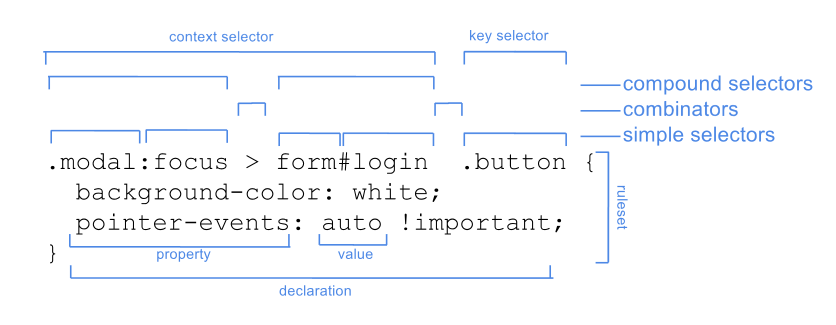
A selector can be a single tag, class, ID, or attribute. It can also be a combination of those elements.