 Micah Godbolt
7cea32428e
Micah Godbolt
7cea32428e
* update to hooks

* more class to function

* cleanup

* finish ts final

* update html lesson

* add lessons page

* clean up

* move getters into context

* adding type

* fix bug

* step 5 cleanup

* init final pass

* text tweak

* fix ternaries

* readme cleanup

* fixed root readme
Step 1.2 - Introduction to CSS (Demo)
CSS properties
Now that we've gone over adding HTML tags to the page, let's cover adding styles to those tags. We can do quite a lot with styles! We can change:
- Typography
- Colors
- Appearance (corners, borders, decorations)
- Layout
- Position
- Display format: inline vs block
- Animations
- and many more
CSS styles are always written in property: value pairs (like background: blue;) and terminated with a semicolon.
Applying CSS to an HTML file
CSS can be applied to HTML tags in three different ways.
- Inline using an HTML tag's
styleattribute<div style="background: blue; color: white;">Hello </div>
- Via a
<style>tag in the HTML page - Through an external CSS file
<link rel="stylesheet" href="./css-demo-finished.css" />
Targeting specific elements
Inline styles are always applied directly to the element you place them on, but <style> tags and external CSS files need a way to match elements with their respective style sets. This is done with CSS selectors. When selectors are combined with CSS styles, we call this a ruleset.
CSS rulesets take on the following form:
selector1,
selector2 {
  property1: value1;
  property2: value2;
}
Here's a more detailed view from Chris Eppstein:
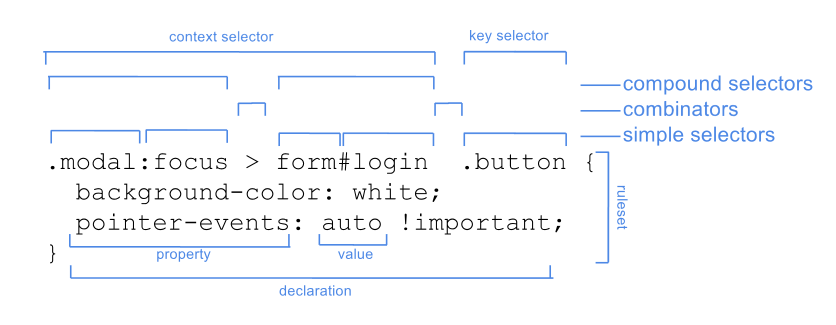
A selector can be a single tag, class, ID, or attribute. It can also be a combination of those elements.
Bonus: Check out the Vocabs project