mirror of
https://github.com/GuDaStudio/codexmcp.git
synced 2026-02-05 02:00:24 +08:00

262 lines
8.9 KiB
Markdown
262 lines
8.9 KiB
Markdown

|
||
|
||
<div align="center">
|
||
|
||
|
||
**让 Claude Code 与 Codex 无缝协作**
|
||
|
||
[](https://opensource.org/licenses/MIT) [](https://www.python.org/downloads/) [](https://modelcontextprotocol.io)[](https://x.com/intent/tweet?text=CodexMCP:让%20Claude%20Code%20与%20Codex%20无缝协作%20https://github.com/GuDaStudio/codexmcp%20%23AI%20%23Coding%20%23MCP) [](https://www.facebook.com/sharer/sharer.php?u=https://github.com/GuDaStudio/codexmcp) [](https://www.reddit.com/submit?title=CodexMCP:让%20Claude%20Code%20与%20Codex%20无缝协作&url=https://github.com/GuDaStudio/codexmcp) [](https://t.me/share/url?url=https://github.com/GuDaStudio/codexmcp&text=CodexMCP:让%20Claude%20Code%20与%20Codex%20无缝协作)
|
||
|
||
|
||
⭐ 在GitHub上给我们点星~您的支持对我们意义重大! 🙏😊
|
||
|
||
[English](./docs/README_EN.md) | 简体中文
|
||
|
||
</div>
|
||
|
||
---
|
||
|
||
## 一、项目简介
|
||
|
||
在当前 AI 辅助编程生态中,**Claude Code** 擅长架构设计与全局思考,而 **Codex** 在代码生成与细节优化上表现卓越。**CodexMCP** 作为两者之间的桥梁,通过 MCP 协议让它们优势互补:
|
||
|
||
- **Claude Code**:负责需求分析、架构规划、代码重构
|
||
- **Codex**:负责算法实现、bug 定位、代码审查
|
||
- **CodexMCP**:管理会话上下文,支持多轮对话与并行任务
|
||
|
||
相比官方 Codex MCP 实现,CodexMCP 引入了**会话持久化**、**并行执行**和**推理追踪**等企业级特性,让 AI 编程助手之间的协作更加智能高效。CodexMCP 与官方 Codex MCP 区别一览:
|
||
|
||
|
||
| 特性 | 官方版 | CodexMCP |
|
||
|------|--------|----------|
|
||
| 基本 Codex 调用 | √ | √ |
|
||
| 多轮对话 | × | √ |
|
||
| 推理详情追踪 | × | √ |
|
||
| 并行任务支持 | × | √ |
|
||
| 错误处理 | × | √ |
|
||
|
||
|
||
---
|
||
|
||
## 二、快速开始
|
||
|
||
### 0. 前置要求
|
||
|
||
请确保您已成功**安装**和**配置**claude code与codex两个编程工具。
|
||
- [Claude Code 安装指南](https://docs.claude.com/docs/claude-code)
|
||
- [Codex CLI 安装指南](https://developers.openai.com/codex/quickstart)
|
||
|
||
<!-- 如果您正在为订阅和配置而忧愁,我们非常欢迎您[积极联系我们](https://cc.guda.studio)。 -->
|
||
|
||
### 1. 安装步骤
|
||
|
||
**1.1** 移除官方 Codex MCP(如果已安装)。
|
||
|
||
```bash
|
||
claude mcp remove codex
|
||
```
|
||
|
||
**1.2** 安装 CodexMCP。
|
||
|
||
```bash
|
||
claude mcp add codex -s user --transport stdio -- uvx --from git+https://github.com/GuDaStudio/codexmcp.git codexmcp
|
||
```
|
||
|
||
**1.3** 验证安装。在 **终端** 中运行:
|
||
|
||
```
|
||
claude mcp list
|
||
```
|
||
|
||
> [!IMPORTANT]
|
||
> 如果看到如下描述,说明安装成功!
|
||
> `codex: uvx --from git+https://github.com/GuDaStudio/codexmcp.git codexmcp - ✓ Connected`
|
||
|
||
### 2. 配置claude code提示词(可选)
|
||
|
||
为使claude code更好完成与codex的协同工作,我们**极力推荐您在 `~/.claude/CLAUDE.md`中添加以下内容**
|
||
|
||
<details>
|
||
<summary>展开查看prompt</summary>
|
||
|
||
|
||
```
|
||
## Core Instruction for CodeX MCP
|
||
|
||
在任何时刻,你必须思考当前过程可以如何与codex进行协作,如何调用Codex 为你提供的MCP工具作为你客观全面分析的保障。
|
||
其中你**务必执行**以下几个步骤:
|
||
**1** 在你对用户需求形成初步分析后,将用户需求、初始思路告知codex,并要求其完善需求分析和实施计划。
|
||
**2** 在实施具体编码任务前,**必须向codex索要代码实现原型(要求codex仅给出unified diff patch,严禁对代码做任何真实修改)**。在获取代码原型后,你**只能以此为逻辑参考,再次对代码修改进行重写**,形成企业生产级别、可读性极高、可维护性极高的代码后,才能实施具体编程修改任务。
|
||
**3** 无论何时,只要完成切实编码行为后,**必须立即使用codex review代码改动和对应需求完成程度**。
|
||
**4** codex只能给出参考,你**必须有自己的思考,甚至需要对codex的回答提出置疑**。尽信书则不如无书,你与codex的最终使命都是达成统一、全面、精准的意见,所以你们必须不断争辩已找到通向真理的唯一途径。
|
||
|
||
|
||
## Codex Tool Invocation Specification
|
||
|
||
1. 工具概述
|
||
|
||
codex MCP 提供了一个工具 `codex`,用于执行 AI 辅助的编码任务。该工具**通过 MCP 协议调用**,无需使用命令行。
|
||
|
||
2. 工具参数
|
||
|
||
**必选**参数:
|
||
- PROMPT (string): 发送给 codex 的任务指令
|
||
- cd (Path): codex 执行任务的工作目录根路径
|
||
|
||
可选参数:
|
||
- sandbox (string): 沙箱策略,可选值:
|
||
- "read-only" (默认): 只读模式,最安全
|
||
- "workspace-write": 允许在工作区写入
|
||
- "danger-full-access": 完全访问权限
|
||
- SESSION_ID (UUID | null): 用于继续之前的会话以与codex进行多轮交互,默认为 None(开启新会话)
|
||
- skip_git_repo_check (boolean): 是否允许在非 Git 仓库中运行,默认 False
|
||
- return_all_messages (boolean): 是否返回所有消息(包括推理、工具调用等),默认 False
|
||
|
||
返回值:
|
||
{
|
||
"success": true,
|
||
"SESSION_ID": "uuid-string",
|
||
"agent_messages": "agent回复的文本内容",
|
||
"all_messages": [] // 仅当 return_all_messages=True 时包含
|
||
}
|
||
或失败时:
|
||
{
|
||
"success": false,
|
||
"error": "错误信息"
|
||
}
|
||
|
||
3. 使用方式
|
||
|
||
开启新对话:
|
||
- 不传 SESSION_ID 参数(或传 None)
|
||
- 工具会返回新的 SESSION_ID 用于后续对话
|
||
|
||
继续之前的对话:
|
||
- 将之前返回的 SESSION_ID 作为参数传入
|
||
- 同一会话的上下文会被保留
|
||
|
||
4. 调用规范
|
||
|
||
**必须遵守**:
|
||
- 每次调用 codex 工具时,必须保存返回的 SESSION_ID,以便后续继续对话
|
||
- cd 参数必须指向存在的目录,否则工具会静默失败
|
||
- 严禁codex对代码进行实际修改,使用 sandbox="read-only" 以避免意外,并要求codex仅给出unified diff patch即可
|
||
|
||
推荐用法:
|
||
- 如需详细追踪 codex 的推理过程和工具调用,设置 return_all_messages=True
|
||
- 对于精准定位、debug、代码原型快速编写等任务,优先使用 codex 工具
|
||
|
||
5. 注意事项
|
||
|
||
- 会话管理:始终追踪 SESSION_ID,避免会话混乱
|
||
- 工作目录:确保 cd 参数指向正确且存在的目录
|
||
- 错误处理:检查返回值的 success 字段,处理可能的错误
|
||
|
||
```
|
||
|
||
</details>
|
||
|
||
|
||
|
||
---
|
||
|
||
## 三、工具说明
|
||
|
||
<details>
|
||
<summary>点击查看codex工具参数说明</summary>
|
||
|
||
| 参数 | 类型 | 必填 | 默认值 | 说明 |
|
||
|------|------|------|--------|------|
|
||
| `PROMPT` | `str` | ✅ | - | 发送给 Codex 的任务指令 |
|
||
| `cd` | `Path` | ✅ | - | Codex 工作目录根路径 |
|
||
| `sandbox` | `Literal` | ❌ | `"read-only"` | 沙箱策略:`read-only` / `workspace-write` / `danger-full-access` |
|
||
| `SESSION_ID` | `UUID \| None` | ❌ | `None` | 会话 ID(None 则开启新会话) |
|
||
| `skip_git_repo_check` | `bool` | ❌ | `False` | 是否允许在非 Git 仓库运行 |
|
||
| `return_all_messages` | `bool` | ❌ | `False` | 是否返回完整推理信息 |
|
||
|
||
</details>
|
||
|
||
<details>
|
||
<summary>点击查看codex工具返回值结构</summary>
|
||
|
||
**成功时:**
|
||
```json
|
||
{
|
||
"success": true,
|
||
"SESSION_ID": "550e8400-e29b-41d4-a716-446655440000",
|
||
"agent_messages": "Codex 的回复内容...",
|
||
"all_messages": [...] // 仅当 return_all_messages=True 时包含
|
||
}
|
||
```
|
||
|
||
**失败时:**
|
||
```json
|
||
{
|
||
"success": false,
|
||
"error": "错误信息描述"
|
||
}
|
||
```
|
||
|
||
</details>
|
||
|
||
---
|
||
|
||
## 四、FAQ
|
||
|
||
<details>
|
||
<summary>Q1: 是否需要额外付费?</summary>
|
||
|
||
**CodexMCP 本身完全免费开源,无需任何额外付费!**
|
||
|
||
</details>
|
||
|
||
<details>
|
||
<summary>Q2: 并行调用会冲突吗?</summary>
|
||
|
||
不会。每个调用使用独立的 `SESSION_ID`,完全隔离。
|
||
|
||
</details>
|
||
|
||
|
||
---
|
||
|
||
## 🤝 贡献指南
|
||
|
||
<details>
|
||
<summary>我们欢迎所有形式的贡献!</summary>
|
||
|
||
### 开发环境配置
|
||
|
||
```bash
|
||
# 克隆仓库
|
||
git clone https://github.com/GuDaStudio/codexmcp.git
|
||
cd codexmcp
|
||
|
||
# 安装依赖
|
||
uv sync
|
||
```
|
||
|
||
### 提交规范
|
||
|
||
- 遵循 [Conventional Commits](https://www.conventionalcommits.org/)
|
||
- 提交测试用例
|
||
- 更新文档
|
||
|
||
</details>
|
||
|
||
|
||
|
||
---
|
||
|
||
## 📄 许可证
|
||
|
||
本项目采用 [MIT License](LICENSE) 开源协议。
|
||
Copyright (c) 2025 [guda.studio](mailto:gudaclaude@gmail.com)
|
||
|
||
---
|
||
<div align="center">
|
||
|
||
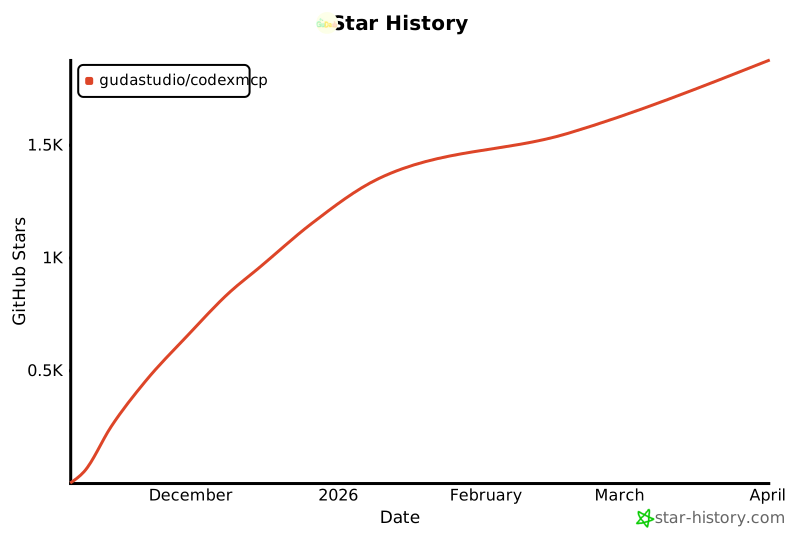
## 用 🌟 为本项目助力~
|
||
[](https://www.star-history.com/#GuDaStudio/codexmcp&type=date&legend=top-left)
|
||
|
||
</div> |